MulMarket: CS2 Trading App, Arbitrage Scanner and Analytics
MulMarket helps Counter-Strike 2 skin traders worldwide quickly spot arbitrage opportunities. This CS2 trading app combines arbitrage scanning, real-time price alerts, portfolio tracking, and market analytics so traders can make faster decisions from one desktop workspace.
MulMarket does not require Steam credentials or a Steam account link. You only need a valid license key, and no personal information is required.
Instant activation, ongoing updates, and a license key tied to your subscription.
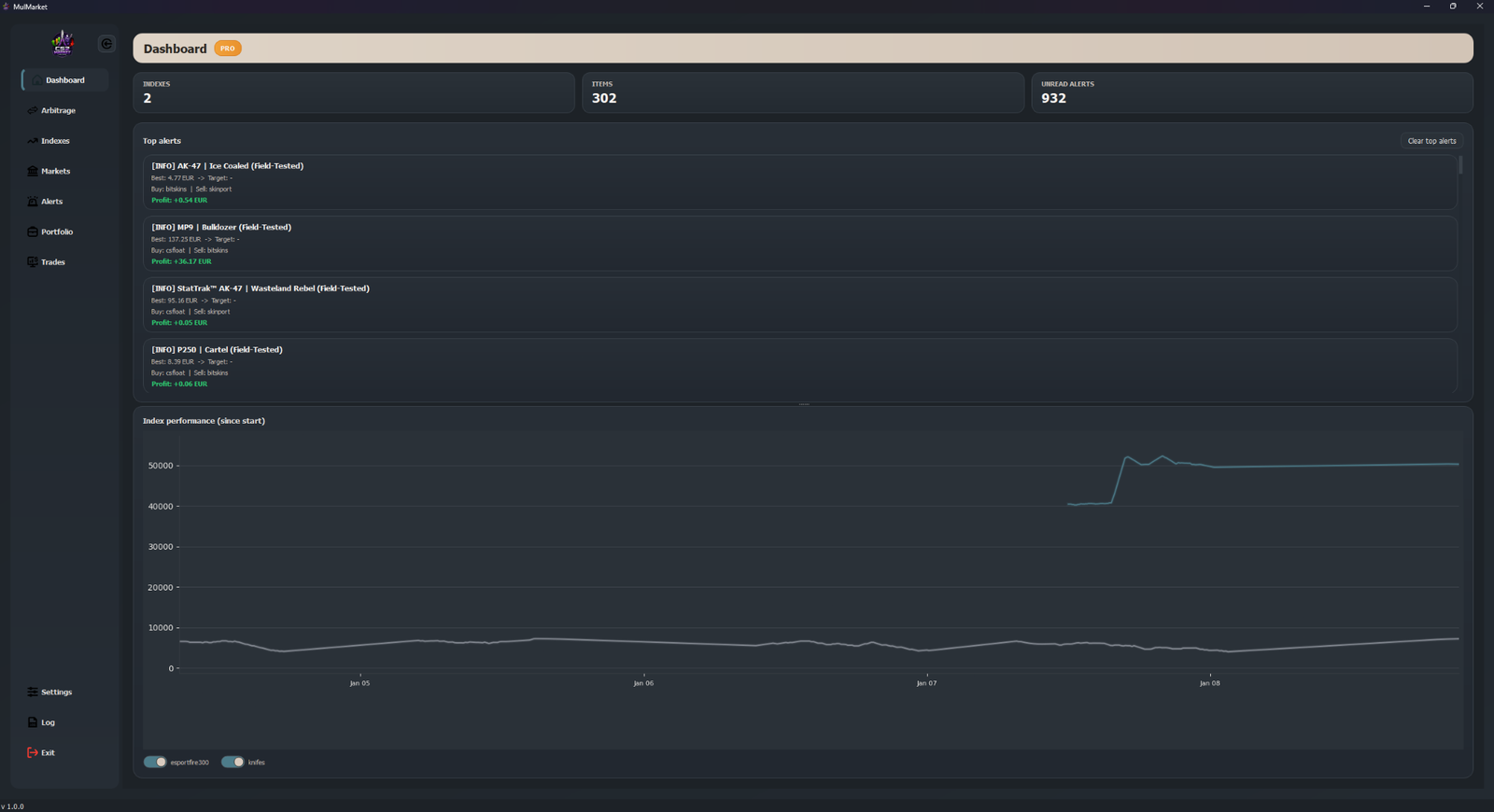
Inside the app
Explore each trading workspace and see how fast you can move from signal to execution.
Find profitable moves before the market catches up.
- Jump across every workspace without leaving the page.
- See how MulMarket connects scanning, alerts, markets, and trade review in one desktop flow.
Demo data shown. Click through the navigation or let the preview rotate automatically.
Pick the mode that fits your workflow
Free is great for light scouting. Pro turns the app into a full analytics desk.
- 01 Top 3 arbitrage opportunities.
- 02 Two markets with fixed delays.
- 03 Basic alerts and read-only portfolio.
- 04 Manual trades with a small cap.
- 01 Full arbitrage list with history and trends.
- 02 Unlimited alerts and smart grouping.
- 03 Portfolio analytics, ROI, and overlays.
- 04 Background refresh, custom markets, and exports.
Feature matrix
Every menu in the app is mapped below so you know exactly what unlocks.
CS2 trading guides
Learn arbitrage workflow, fee-aware execution, and alert strategy with practical tutorials for global skin traders.
Terms of Service
Last updated: January 11, 2026
These Terms of Service ("Terms") govern your access to and use of MulMarket, a desktop software application operated by Nicolas Polák-MulMarket (a sole proprietor registered in Slovakia, Business ID: 57412219). By downloading, installing, accessing, or using MulMarket, you agree to be bound by these Terms.
- 1. Eligibility: You must be at least 13 years old, or the minimum legal age required in your jurisdiction, to use MulMarket.
- 2. License Grant: We grant you a limited, non-exclusive, non-transferable, and revocable license to use MulMarket for personal or business purposes, subject to these Terms. This license does not transfer ownership of the software.
- 3. Pro Features & Licensing: Some features require an active paid subscription ("Pro"). Licenses are per user and per device unless explicitly stated otherwise. You may not share, resell, sublicense, or bypass licensing mechanisms. We reserve the right to suspend or revoke licenses in cases of abuse, fraud, or violations of these Terms.
- 4. Payments, Billing & Subscriptions: Payments are processed by Paddle, which acts as the Merchant of Record. Prices and subscription terms are shown at checkout. Subscriptions may renew automatically unless canceled. We do not store or process payment card information.
- 5. Refunds & Right to Cancel: If you are a consumer, you have the right to request a full refund within 14 days from the date of purchase without providing any reason. This right applies to the initial subscription purchase and does not apply to subsequent automatic renewal payments. All refund and cancellation requests are handled by Paddle as the Merchant of Record. To request a refund, please contact Paddle through their official support channels.
- 6. Offline-First & Data Responsibility: MulMarket is an offline-first application. All user data is stored locally on your device. Data is not synced to the cloud. You are responsible for maintaining backups of any exported or local data.
- 7. Network Use: MulMarket may connect to market price APIs, license validation services, optional update feeds, and optional currency rate providers. Availability of these services is not guaranteed.
- 8. Prohibited Use: You may not reverse engineer, decompile, modify, or tamper with the software; circumvent or disable license or security checks; use the service for illegal activities; or attempt unauthorized access to systems or data.
- 9. No Financial Advice: MulMarket provides market data and analytics only. It does not provide financial, investment, or trading advice. Use of the software is at your own risk.
- 10. Limitation of Liability: To the maximum extent permitted by law, MulMarket is not liable for indirect, incidental, special, or consequential damages. This includes loss of profits, data, or business opportunities. Total liability shall not exceed the amount paid for the service in the preceding 12 months.
- 11. Termination: We may suspend or terminate access immediately if you violate these Terms. You may stop using the service at any time.
- 12. Governing Law: These Terms are governed by the laws of the Slovak Republic, without regard to conflict of law principles.
- 13. Contact: Service Operator: Nicolas Polák-MulMarket. Registered Address: Bazovského 1811/13, 841 01 Bratislava-Dúbravka, Slovakia. Email: admin@mulmarket.store
Privacy Policy
Last updated: January 11, 2026
Your privacy matters. This Privacy Policy explains how MulMarket collects, uses, and protects data.
- 1. Data We Collect: We collect only the minimum data required to operate the service: license key, device ID and device fingerprint, license status, timestamps and app version, and network metadata (IP address, user agent) for security and abuse prevention.
- 2. Optional Support Data: If you contact support, you may voluntarily share logs or diagnostics to help troubleshoot issues.
- 3. Data We Do Not Collect: We do not collect payment card information (handled by Paddle), Steam or marketplace passwords, or government identity documents.
- 4. How We Use Data: We use collected data to validate licenses, prevent abuse, deliver updates, improve stability, and provide support when requested.
- 5. Data Storage: License metadata is stored on our servers for validation. Local settings, indexes, alerts, and portfolio data remain on your device unless exported.
- 6. Third-Party Services: MulMarket relies on trusted third parties, including Paddle for payment processing and Cloudflare for license validation hosting. Market connectors and update downloads may communicate directly with third-party services, which may log IP addresses and request metadata.
- 7. Data Retention: We retain license and support data only as long as necessary to operate the service and comply with legal obligations.
- 8. Your Rights (GDPR): If you are located in the EU/EEA, you have the right to access your data, request correction or deletion, restrict or object to processing, and request data portability. Requests can be made via email.
- 9. Your Choices: You may request data deletion by contacting us, subject to legal obligations.
- 10. Security: We use reasonable technical and organizational measures to protect data. No system is 100% secure.
- 11. Policy Updates: We may update this Privacy Policy from time to time. The effective date will be updated accordingly.
- 12. International Data Transfers: Some data may be processed outside the European Union or European Economic Area by our trusted service providers, including Paddle and Cloudflare. Such transfers are protected by appropriate safeguards, including Standard Contractual Clauses in accordance with GDPR.
- 13. Privacy Contact: For privacy requests, data access, correction, deletion, or GDPR questions, contact Nicolas Polák-MulMarket at admin@mulmarket.store.
FAQ
- Q Can I use Free forever? Yes, Free stays available with the download.
- Q Where is my key? We display it here after payment, and it is tied to your subscription.
- Q Need help? Email support with your Paddle session id.